 how-to
How to Design Professional Logos for Glass Engraving
Table of Contents
- Why Logo Design for Glass Engraving Fails Before the Laser Fires
- How to Prepare a Logo for Glass Engraving: The Artwork Checklist
- Choosing the Best Engraving Logo File Formats
- Building a Vector Logo for Engraving That Holds Its Shape
- Glass Etching Logo Ideas That Work on Curved Surfaces
- Logo Placement, Scale and Curved Glass Distortion
- Proofing, Test Engraving and Quality Control Before Production
- Frequently Asked Questions
Last Updated: October 18, 2026
Why Logo Design for Glass Engraving Fails Before the Laser Fires
Most engraving problems are design problems. A logo that looks sharp on screen can turn to mush on glass, and the laser gets blamed for a file never built for it.
Glass gives you no colour and no ink, one tone: frosted white against clear. Every logo decision must work within that limit.
At The Glassware Company, clients send artwork that is beautiful on paper and unreadable once etched. The fix always happens in the file, before production starts.
How to Prepare a Logo for Glass Engraving: The Artwork Checklist
Preparing a logo for glass engraving means converting it to a clean, single-colour vector file with thick lines, open negative space and no gradients. Glass imposes hard physical limits on line weight, feature size and contrast that paper never does. Run this checklist before sending anything to a supplier:
- Logo is a vector file (SVG, EPS, AI or PDF), not a screenshot
- All text is converted to outlines or paths
- Design is one solid colour, usually black on white
Glass-Specific Artwork Specifications: Line Weight, Text Height and Contrast
The frosted mark is created by disrupting the surface, and the resulting edge has a finite resolution; features below it fray, fill in or vanish.
| Feature | Minimum for reliable engraving | Why it matters |
|---|---|---|
| Line weight | 0.5 mm at final size (1.0 mm preferred for sandblasting) | Thinner lines under-etch or break up |
| Text height | 3 mm cap height for laser, 5 mm for sandblasting | Smaller text fills in and becomes illegible |
| Negative space | At least 1× the line weight between features | Cramped gaps close up when frosted |
| Contrast | Solid black on white only | Grey or mid-tones produce uneven frosting |
| Detail size | No feature smaller than 1 mm | Tiny details disappear entirely |
These numbers reflect the spot size of a typical laser head, the grit size used in sandblasting and how frosted glass scatters light.
Glass gives you only one tone: frosted white against clear. Every element must be fully frosted or fully clear; anything in between becomes an uncontrolled grey that varies with glass thickness and lighting.
Line Weight, Negative Space and Legibility at Small Scale
Thin lines disappear.
Aim for bold, confident strokes. Switch light-weight typefaces to the bold cut, and redraw fine hairlines thicker.
Negative space is the other half of the job. Cramped counters in letters like "e" and "a" fill in and turn into blobs.
Test it simply: shrink your logo to its actual size and print it in black and white.
Vector and Raster Artwork: Which One Survives Engraving
Vector artwork is built from mathematical paths and scales to any size without losing sharpness. Raster artwork is built from pixels and breaks down when enlarged. (Raster vs. vector: What are the differences?)
Only vector survives engraving cleanly: vector files scale to any glass size with crisp edges, let the engraver adjust line weight directly, and avoid the pixelation and manual tracing raster images force.
If vector is not available, a very high-resolution raster can sometimes be traced, but that adds time and cost and is never as clean as the original. Acceptable for a one-off gift; for branded glassware in batches, always insist on the original vector.
Choosing the Best Engraving Logo File Formats
The best engraving logo file formats are SVG, EPS, AI and vector PDF, clean paths that scale without loss. JPG, PNG and GIF are raster and should be avoided for production.
| Format | Type | Good for engraving? | Notes |
|---|---|---|---|
| SVG | Vector | Yes | Clean, editable, widely accepted |
| EPS | Vector | Yes | Industry standard for print and engraving |
| AI | Vector | Yes | Adobe Illustrator source file |
| PDF (vector) | Vector | Yes | Confirm it is not a scanned image |
| PNG | Raster | No | Pixelates when scaled |
| JPG | Raster | No | Compression artefacts ruin edges |
One trap: a PDF can be either vector or a wrapped raster image. Open it and zoom in. If the edges turn blocky, it is raster wearing a vector coat.
Building a Vector Logo for Engraving That Holds Its Shape
Building a vector logo for engraving means simplifying the design to what a single-tone process can carry: less detail, more contrast, stronger shapes.
Start with these moves:
- Reduce to one colour. Remove all fills, gradients and transparency.
- Simplify detail. Drop tiny text, thin rules and busy texture.
- Thicken strokes. Set a minimum line weight that survives etching.
- Open the negative space. Widen gaps in tight lettering.
- Convert text to outlines. Lock the letterforms in place.
- Check alignment. Centre the mark and confirm it sits within the engraving area.
- Export clean. Save as SVG or EPS with no hidden layers.
The goal is not a different logo, it is the same logo, rebuilt for a surface that only speaks in frosted and clear. For corporate clients ordering branded glassware across multiple product lines, this vector master becomes the single source of truth.
Glass Etching Logo Ideas That Work on Curved Surfaces
The best glass etching logo ideas lean on simplicity: single-colour marks, strong silhouettes, generous spacing and designs built for a curved surface. Complexity fights the glass.
Here is what works well:
- Bold monograms with thick, open letterforms
- Simple icon plus wordmark stacked vertically for narrow glass
- Line-art emblems with confident, even strokes
What fails: photographic logos, multi-colour crests, intricate crests with fine detail, and anything relying on shading or gradient.
Curved surfaces add a wrinkle: a flat design distorts when wrapped around a bowl or stein.
Logo Placement, Scale and Curved Glass Distortion
Logo placement on glassware should sit in the flattest, most visible area of the vessel, scaled to leave clear margins on every side. On curved glass, keep the mark centred to limit distortion.
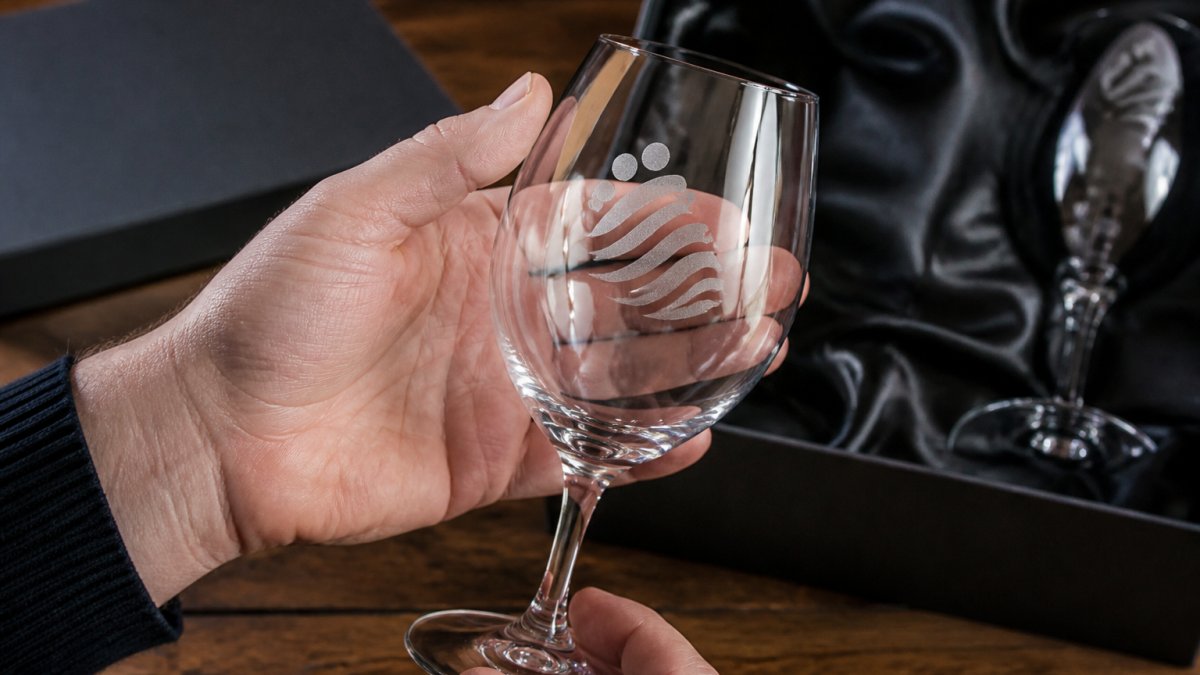
Placement rules that hold up in practice:
- Centre the logo on the front face, not near seams or handles
- Leave a clear margin so the mark does not crowd the rim or base
- Scale down on small vessels; a logo that fills a stein overwhelms a flute
Curved glass distortion is the silent killer: as the surface bends away from the engraving head, the effective size and sharpness of the mark change.
Proofing, Test Engraving and Quality Control Before Production
Proofing means approving a single-colour digital proof and, where possible, a physical test engraving before the full run. For professional logo work it is a repeatable workflow connecting the client's artwork file to the finished batch.
The Proofing Workflow: From File to Sign-Off
A professional proofing process has four stages, each with an approval gate:
- Artwork intake and audit. The supplier reviews the file against the glass-specific specifications (line weight, text height, negative space, contrast) and flags anything that will not translate before a proof is made. This is where most problems are caught.
- Digital proof. A single-colour, to-scale proof showing exact size, placement and orientation on the intended vessel. The client approves or requests changes.
- Physical test engraving. A test piece on the same glass type, using the same settings as the production run, confirming contrast, edge sharpness and placement. For curved glass this is essential because a flat proof cannot show wrap distortion.
- Production sign-off. The client approves the test piece, and the approved file and settings are locked for the batch. Any reorder pulls from the same locked file.
Our proofing process at The Glassware Company is built around one question: will the finished glass match what you approve? We send a clear proof showing exact size and placement, flag anything that will not translate well, and nothing goes into production until you sign off.
Test Engraving Parameters and What to Check
A test engraving is only useful if it uses the same settings as the production run, changing power, speed or resolution between test and batch invalidates it.
| Parameter | What to lock | What to check on the test piece |
|---|---|---|
| Power | The exact setting for the glass type | Frosting is even, not scorched or too faint |
| Speed | The exact setting for the glass type | Edges are crisp, not melted or blurred |
| Resolution | The exact dots-per-inch for the artwork | Fine detail holds; no banding or stepping |
| Focus | The exact focal distance for the curved surface | Line width is consistent across the mark |
| Masking | The exact masking material and application | No chips, no residue, clean removal |
On the test piece, inspect four things: contrast (is the frosted mark clearly visible?), edge sharpness (clean or ragged lines?), placement (does the mark sit where the proof showed?) and surface integrity (any micro-cracks or chips?).
A common false economy is testing on the same glass type but a different shape, a flat tumbler when production runs on a curved stein.
Batch Quality Control and Consistency Checks
Quality control then runs across the batch:
- Confirm the etched mark matches the approved proof
- Check edge sharpness and contrast on every run
- Verify placement and alignment are consistent
For professional orders, add a sampling protocol: inspect the first piece off the line against the approved test piece, then sample at regular intervals. Record settings and any deviations; if a piece fails, quarantine the batch and trace the cause, artwork, settings, glass variation or machine drift. Consistency across reorders comes down to the master vector file and the locked settings record.
Artwork Handoff and Commercial Production Specifications
For commercial orders, the handoff from client to engraver is where most delays and errors originate. A complete package includes:
- The original vector file, with text converted to outlines
- A single-colour proof at actual size, showing placement on the vessel
- The intended glass type, shape and quantity
Communicating specifications in writing, line weight, text height, placement and colour, removes ambiguity. For repeat orders, the locked file and settings record become the specification.
For corporate gifts and branded glassware that carries your name into boardrooms and tasting rooms, that consistency is the whole point. For a premium finish, our custom manufactured gift boxing service presents etched and branded glassware in purpose-built packaging, with an approximate 28 working day turnaround.
Safety matters too: glass dust and laser fumes need proper extraction and protective equipment in any production setting. We handle that side so you do not have to.
Frequently Asked Questions
What logo file format is best for glass engraving?
Vector formats are the safest starting point because they scale without losing edge definition. Supply an SVG, EPS, AI or PDF with editable paths, and keep all text converted to outlines so no font substitution occurs. If only a raster image exists, send the largest high-resolution PNG or TIFF available, ideally at 300 dpi or higher at final print size. Engravers can trace a raster file, but fine detail and thin strokes will need simplifying. Always include a single-colour black version for engraving reference.
How do you simplify a logo for engraving on glass?
Strip the design back to what the engraving process can actually reproduce. Remove gradients, drop shadows, halftones and multi-colour fills, because glass engraving works in a single frosted tone. Thicken hairlines below roughly 0.5 mm, open up tight negative space, and drop taglines or secondary text that will blur at small sizes. Convert the logo to solid black on white and check it at the actual engraved size on screen. If it reads clearly at that scale, it will engrave cleanly.
Can detailed logos be engraved on glass?
Detailed logos can be engraved, but not every detail survives. Laser engraving holds fine linework better than sandblasting or etching cream, which tend to soften edges. Photographic detail, tiny type and intricate crests often need simplifying into a cleaner line version. Ask for a test engraving on a spare glass of the same type before committing to a full run. If the detail matters, consider a larger engraving area or a simpler mark for smaller glassware.
How can you preview a logo on glassware before engraving?
Request a digital proof showing the artwork positioned on the actual glass shape, at the real size and placement. Check line weight, alignment and how the logo sits against the curve of the bowl or tumbler. For larger or repeat orders, ask for a physical sample engraving on one glass. This catches distortion, contrast and legibility issues that a flat screen proof hides. Confirm the proof in writing before production begins, and keep the approved file for reorders.